

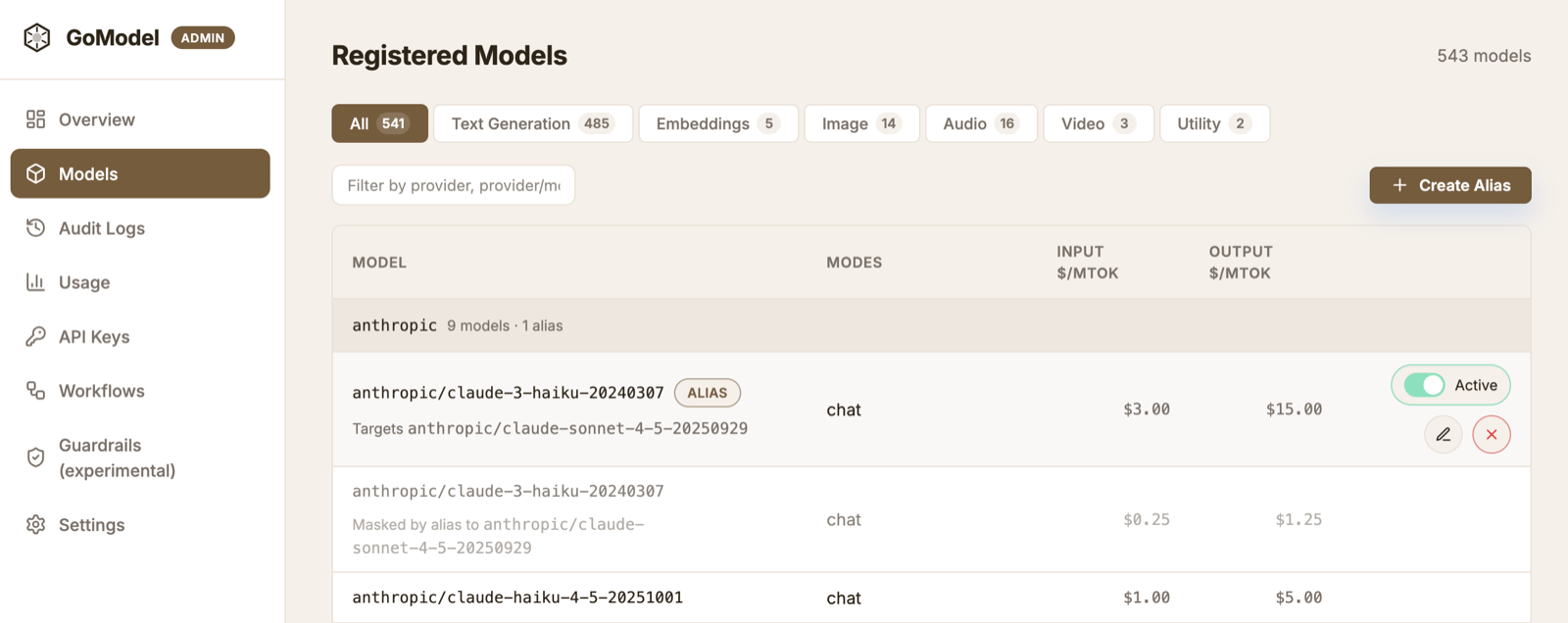
What virtual models do
A virtual model is a model you define, instead of one a provider advertises. GoModel picks the kind from whether you give it a target:- A redirect (an alias) is a stable name that points to a concrete provider
model. Your app sends the name in the
modelfield, and GoModel resolves it before sending the request upstream. - An access policy has no target. It gates an existing model selector by
user_path— or disables it entirely — without adding a new name. See User Path for access control.
Models -> New virtual model.
Fill Target model to make a redirect; leave it empty to make an access
policy on the Source selector.
The rest of this page covers redirects.
Use stable names
You can expose names likeregular and smarter instead of provider-specific
model IDs.
regular->anthropic/claude-sonnet-4-6smarter->anthropic/claude-opus-4-6
Load balance across models
A redirect can point at several target models and spread requests across them. Add more than one target in the editor (Add target) and pick a strategy:- Round-robin (default) rotates requests evenly across the targets. Set a
per-target weight to bias the share — a target with weight
2receives twice the traffic of a target with weight1. - Lowest cost routes every request to the cheapest currently-available target, ranked by the model registry’s input + output per-token price. When a target has no registry pricing it is skipped while a priced target exists; if none are priced, the first listed target is used.
smart at both openai/gpt-4o and anthropic/claude-sonnet-4-6
with the round-robin strategy to split load, or at a premium and a budget model
with the cost strategy to always take the cheaper one.
Rename or repoint a redirect
Open a redirect in the dashboard and edit its Source to rename it. GoModel moves the definition to the new name in one step — the old name stops resolving, so update any app still sending it. Renaming onto a name that already belongs to another virtual model is rejected; renaming onto a concrete model name shadows that model (see Shadow a model). Redirects that shadow a model can be edited the same way — use the model row’s Edit redirect action. Virtual models declared as code keep theirsource
fixed in configuration; rename them by editing the declaration.
Define virtual models as code
Operators who manage configuration as infrastructure-as-code can declare virtual models inconfig.yaml or the VIRTUAL_MODELS environment variable instead of
the dashboard. Declarative entries are applied at startup, override any
admin-store row with the same source, and are shown read-only in the dashboard
(a Config badge). Edit the configuration to change them.
In config.yaml:
config.yaml entries with a matching source:
source, a single target (shorthand) or a targets list,
strategy (round_robin or cost), user_paths, description, and enabled.
Leave the targets empty to declare an access policy on the source selector. An
invalid declaration (unknown strategy, missing or self-referential target) fails
startup with a clear error.
Expose only redirects
To hide provider models fromGET /v1/models, set:
/v1/models
instead of the full provider model list. The setting is also listed in
.env.template.
Shadow a model
A redirect can “shadow” a model by using the same name as an existing model and pointing it somewhere else. This lets you override a requested model without changing application code. For example:- source:
anthropic/claude-opus-4-6 - target model:
anthropic/claude-sonnet-4-6
anthropic/claude-opus-4-6, while GoModel routes the
request to anthropic/claude-sonnet-4-6.
A/B testing
Redirects are useful for short model experiments. Move a redirect from one target to another, then compare app behavior, latency, and usage. For example, pointsmarter at Opus for one test and Sonnet for another. You can
also shadow opus-4-6 with sonnet-4-6 to check whether the same app flow still
works.